Book Cover Design for Self-Published Authors: 9 Rules (2026)
Book cover design for self-published authors: KDP specs, spine math, real 2025 cover costs and reader data to help your book win the click and the sale.
Why does book cover design matter so much for indie books?
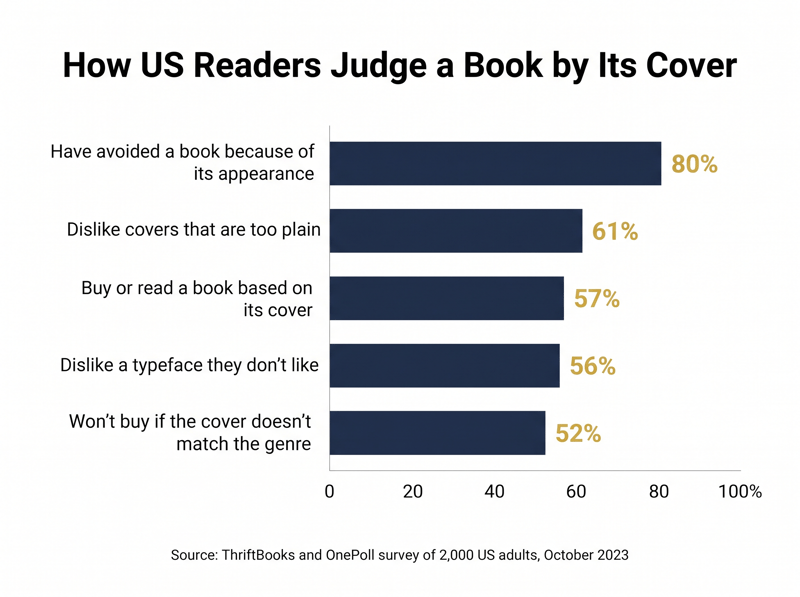
Readers say it out loud: the cover decides whether they look closer. In the ThriftBooks and OnePoll survey reported by Malay Mail, 57% of Americans said they pick books to buy or read based on the cover, and 96% said books chosen that way met or beat their expectations. Three in ten said the cover is the most important factor when they buy a book for someone else.
The negative signal is even stronger. In the same survey, 80% of respondents said they had avoided buying a book because of its outward appearance. That is the real cost of a weak cover: not a bad review, but a reader who never clicks your listing at all.
For an indie author, there is no bookstore buyer, sales rep or publisher marketing team to compensate. Your cover sits in a grid of search results next to traditionally published titles, and it has to compete on equal footing from day one.
Rule 1: Why should your cover match your genre first?
A cover is a genre signal before it is a work of art. In the ThriftBooks survey, 52% of Americans said they would not buy a book whose cover did not match its literary genre. A cozy mystery dressed like a dark thriller attracts the wrong readers, and the wrong readers leave the wrong reviews.
Before you brief a designer or open a design tool, list the top 20 books in the exact Amazon category you plan to target. If you have not chosen your categories yet, start with our guide to choosing the best KDP categories. Then note the patterns:
- Imagery: people, objects, landscapes or pure typography||Color mood: dark and saturated, bright and pastel, or muted and literary||Title treatment: big bold sans serif, script, or elegant serif||Author name size: series authors often run the name as large as the title||Layout: centered figure, full-bleed scene, or pattern background
Your goal is to look like you belong on that page, then add one distinctive element that makes your book memorable. Standing out by breaking every convention usually just makes the book look like it's in the wrong aisle.
Rule 2: How do you design a cover that works as a thumbnail?
Most readers first see your cover as a small image in search results, ads or a phone screen. The Book Designer compares a cover to a billboard: billboards usually carry 6 words or less, and a cover has about 3 to 5 seconds to communicate. Design at full size, but judge the design at the size a shopper actually sees.
Practical thumbnail rules that hold across genres:
- Pick one principal focal point instead of three competing images||Make the title large enough to read when the cover is the size of a postage stamp||Use no more than two complementary typefaces, a limit the Alliance of Independent Authors also recommends||Keep the palette to a few colors with strong contrast between text and background||Cut subtitles, taglines and blurbs that turn into gray noise when shrunk
Plainness is a risk too. In the ThriftBooks data, 61% of respondents disliked covers that are too plain, and 56% disliked covers that use a typeface they don't like. Simple is good; empty is not.
Rule 3: What are the exact KDP ebook cover requirements?
Amazon publishes the rules in its Cover Image Guidelines for Kindle eBooks. Uploads that break the required limits fail, so treat these as non-negotiable:
- Ideal size: 2,560 pixels high by 1,600 pixels wide (a 1.6 to 1 height to width ratio)||Minimum: at least 500 pixels on the longest side, or the cover won't display on the website||Maximum: 10,000 pixels or fewer on each side, and a file size of 50 MB or less||Formats: JPEG (preferred), PNG, TIFF or non-animated GIF; SVG is not supported||Resolution and color: 300 DPI minimum, RGB recommended (CMYK is converted automatically)
The content rules matter just as much. Your title and author name must appear on the cover, and the cover text must not contradict your Amazon detail page. The cover must not mention pricing or temporary promotions, and it must not infringe another artist's or publisher's copyright.
One more practical tip from the same page: if your cover has a white or very light background, Amazon suggests adding a narrow 3 to 4 pixel medium gray border so it doesn't disappear against the white store page. Never stretch a small image up to the recommended size, because the result looks soft and unprofessional.
Rule 4: How do you calculate a paperback or hardcover cover?
A print cover is one wide image: back cover, spine and front cover together, delivered as a single PDF. KDP's Create a Paperback Cover page gives the formulas, and every number depends on your final page count, so lock the interior before the designer finalizes the wrap.
Paperback cover formula
- Cover width = bleed + back cover width + spine width + front cover width + bleed||Cover height = bleed + trim height + bleed||Bleed: 0.125 inches (3.2 mm) on the top, bottom and outside edges||Spine width, black ink on white paper: page count x 0.002252 inches||Spine width, black ink on cream paper: page count x 0.0025 inches||Spine width, premium color paper: page count x 0.002347 inches
Here is a worked example. A 6 x 9 inch paperback with 300 pages on white paper has a spine of 300 x 0.002252 = 0.6756 inches. The full cover is 0.125 + 6 + 0.6756 + 6 + 0.125 = 12.9256 inches wide and 0.125 + 9 + 0.125 = 9.25 inches high. Print the same book on cream paper and the spine grows to 0.75 inches, which is why switching paper late breaks a finished cover.
Other paperback rules from KDP: your book needs at least 79 pages for spine text, keep all text at least 0.125 inches inside the trim lines, use 300 DPI images in CMYK, and use at least a 7 point font. KDP recommends a cover file of 40 MB or less, and files over 650 MB won't convert. Flatten transparencies, embed fonts and remove crop marks before you upload.
Hardcover differences
Hardcovers use a case laminate wrap with different margins. The KDP hardcover cover page asks for a wrap of 0.51 inches past the edge of the front cover, text and images at least 0.635 inches from the edge of the book, and a 0.4 inch hinge space between the spine and the safe area. If you supply your own barcode, it must be 2 inches wide by 1.2 inches high at 300 DPI. Use KDP's cover calculator for the exact hardcover spine width.
Rule 5: How much does a professional book cover cost?
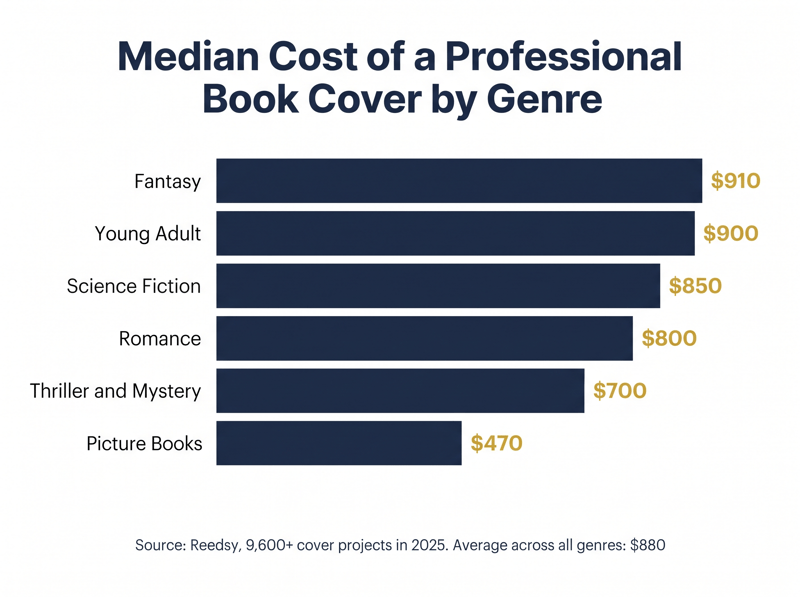
The best current data comes from Reedsy, which analyzed more than 9,600 cover design projects in 2025. The average professional cover cost $880, and most projects fell between $625 and $1,250. Genre moves the price: illustration heavy genres such as fantasy and young adult cost more than photo based thrillers.
Not every book needs a custom commission. Barnes & Noble Press breaks the market into three budget tiers:
- Pre-made covers: typically $50 to $150, fast and genre appropriate, but not exclusive in style||Design contests on marketplaces: from $200 to $1,000 or more, with many concepts to choose from||Established cover designers: often $1,000 or more, with full custom art and print wraps
Remember that the ebook front is only part of the job. Reedsy notes that a fantasy cover with a full print wrap can push the total closer to $2,000. Ask every designer whether the quote includes the paperback and hardcover wraps, a 3D mockup and future spine changes, so you compare like with like.
Rule 6: Can you use AI-generated art on a KDP cover?
You can, but you must tell Amazon. KDP's Content Guidelines require you to inform KDP of AI-generated content, including text, images and translations, when you publish a new book. The guidelines state that AI-generated images include cover and interior images and artwork, and that content still counts as AI-generated even if you applied substantial edits afterwards.
AI-assisted work is treated differently. If you created the art yourself and only used AI tools to edit or refine it, KDP says you don't need to disclose it. The same guidelines apply to your title, cover art and product description, and descriptive content meant to mislead customers is not allowed.
Rule 7: Where does a cover actually influence sales?
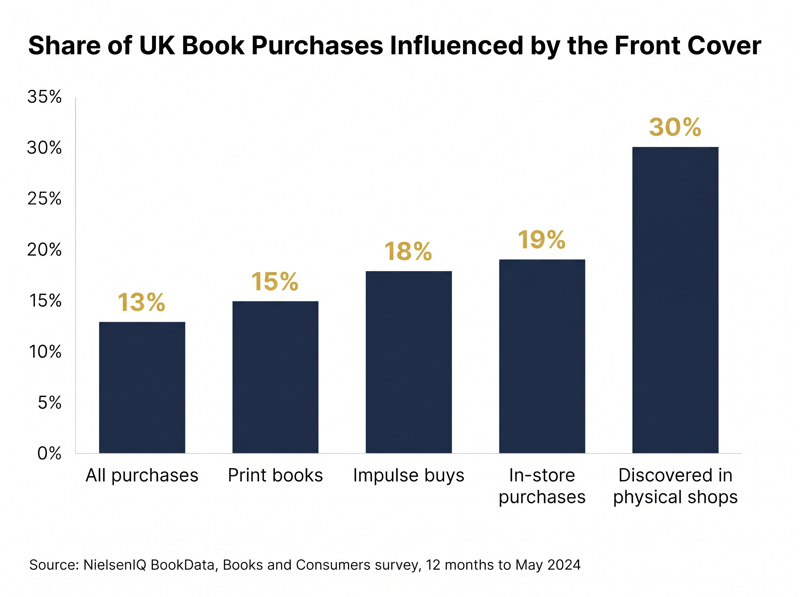
Here is the angle most cover guides miss: a cover is a discovery tool more than a closing tool. NielsenIQ BookData found that 13% of UK book purchases in the 12 months to May 2024 were influenced by the front cover, rising to 18% of impulse buys and 30% of books discovered in physical shops.
A BookNet Canada study points the same way. Only 6.9% of Canadian readers ranked cover design as the top influence on what they read, far behind familiarity with the author at 35.5% and reading a synopsis at 25.8%.
Put those findings together and the job of your cover becomes clear: earn the click, then hand off to your description, your sample and your reviews. That is why a great cover on a listing with no reviews still struggles. Pair your design work with a strong Amazon book description and a plan to collect early reviews, and see our data on how many reviews a book needs to sell.
Rule 8: How do you brief a cover designer?
A good brief saves rounds of revisions and money. The Alliance of Independent Authors stresses briefing designers clearly and keeping branding consistent across your whole catalog, which matters even more if you write a series. Send your designer:
- Genre, subgenre and the exact Amazon categories you will target||Three to five comparable covers from current bestsellers, with what you like about each||A one paragraph summary of the book's tone, setting and main character||Exact title, subtitle, series name and author name as they will appear on Amazon||Formats needed: ebook, paperback, hardcover, audiobook square, and ad or social sizes||Trim size, paper type and final page count for each print edition||Series plans, so fonts and layout can carry across future books
Agree on the number of concepts and revision rounds in writing, and ask for layered source files or at least high resolution exports for each format. You will need them for ads, A+ Content and future editions.
Rule 9: How do you test a cover before you publish?
Don't approve a cover on a big monitor in a quiet room. Test it where readers will meet it:
- Shrink it to about the size of an Amazon search result and check that the title is still readable||Place it in a screenshot of your category's bestseller list and ask whether it looks like it belongs||View it in grayscale to check contrast for e-ink Kindle screens||Show two or three versions to readers of your genre and ask which they would click, not which they like||Check the print proof in daylight, since CMYK printing often looks darker than the screen
On Read & Rate, our Book Biometrics tool analyzes your full Amazon listing, including the cover, title, description and A+ Content, and our author community can give honest feedback on cover options before you commit. If you already have A+ Content, keep it visually consistent with your cover, as covered in our guide to Amazon A+ Content for authors.
What are the most common book cover design mistakes?
- Choosing art you love over art that signals the right genre||Using too many fonts, or a font that becomes unreadable at thumbnail size||Designing only the ebook front and discovering the print wrap costs extra||Building the spine before the interior page count is final||Putting prices, sale banners or temporary offers on the cover image, which KDP prohibits||Uploading a stretched, low resolution image below KDP's recommended size||Leaving AI-generated cover art undisclosed during KDP setup
Fixing a cover after launch is possible, and many indie authors refresh covers to revive a backlist. But each relaunch costs money and momentum, so it pays to get the first version right.
A strong cover earns the click, but reviews earn the sale. Read & Rate connects your book with a community of genuine readers who leave honest reviews on Amazon, Goodreads, Barnes & Noble and more, with watermarked files and private feedback for every author. Start your free trial and put your new cover in front of real readers.