Amazon Book Description: How to Write One That Sells (2026)
Amazon reads your book description for context now, not keywords. Get KDP's real rules, the 4,000-character limit, and a blurb framework that converts.
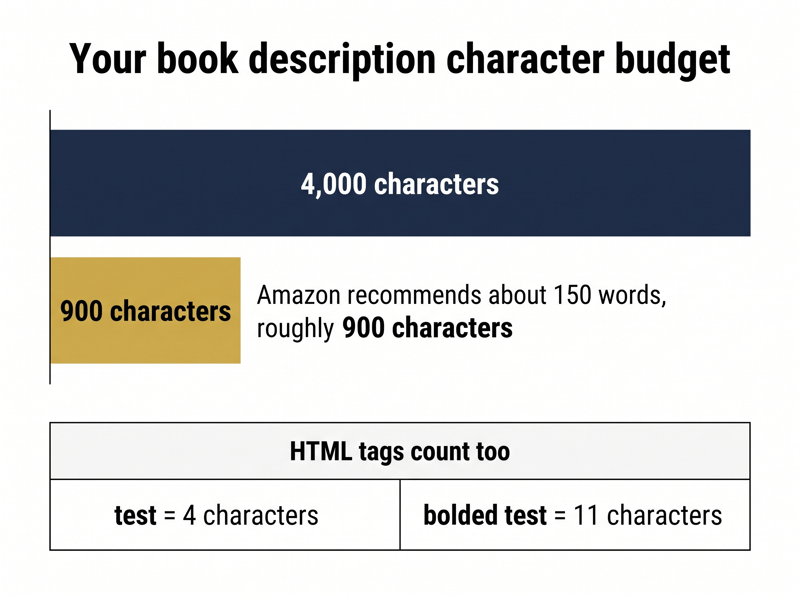
Four thousand characters. That is the hard ceiling Amazon puts on a book description, and every opening and closing HTML tag is counted against it. Bold the word test and you have spent 11 characters rather than 4, because the b tags count too. Amazon documents both rules on its Write a Book Description help page, then recommends you use a fraction of that budget: aim for a 150-word paragraph with sentences that are easy to scan.
Most authors do the opposite. They treat the field as free real estate and pack it with every genre term they can think of, which is a job that belongs to the seven backend keyword fields, not the description. Under Amazon's current ranking behaviour that habit is not neutral. It costs you.
Why does your book description matter more in 2026?
Because Amazon changed what it rewards. The ranking behaviour authors call A10 leans on semantic matching rather than keyword counting. Amazon's own published research on COSMO, its commerce knowledge system, describes modelling the relationships between shopper intent and product concepts instead of literal term overlap. Written Word Media's breakdown of the change is blunter: keyword stuffing your book description is now actively hurting you.
The practical consequence is a change of job description. Your blurb used to be a keyword container that happened to be readable. It is now a relevance signal and a conversion asset at the same time. Amazon reads it to work out what kind of book you wrote and who should see it. Readers read it to decide whether to buy.
- Amazon infers genre, subgenre, tropes and reader outcome from your description, not just typed query matches||Cover and copy are evaluated together, so a mismatch between the two drags down click-through and conversion||Weak conversion feeds back into ranking, which means a poor description quietly suppresses everything else you do||Descriptions stay editable forever, so this is one of the few listing problems you can fix this afternoon
What are Amazon's actual rules for book descriptions?
Stricter than most authors realise, and published in plain sight. Amazon gives three writing principles on the description help page, simple, compelling and professional, then follows them with a list of content the field will not accept. The KDP Metadata Guidelines for Books back the same restrictions.
- Phone numbers, physical mail addresses, email addresses or website URLs||Reviews, quotes or testimonials||Requests for customer reviews||Advertisements, watermarks on images or videos, or promotional material||Time-sensitive information such as tour, seminar or lecture dates||Availability, pricing or alternative ordering information, including links to other stores||Spoilers for the book||Unicode emojis||Any keyword or book tag phrases
Two of those catch experienced authors off guard. The first is testimonials. Plenty of older guides tell you to open with a five-star pull quote, and Amazon's current policy lists reviews, quotes and testimonials as content it cannot accept in the description field. Editorial praise belongs in A+ Content, where it is explicitly welcome.
The second is the closing line. The classic scroll up and click Buy Now sign-off sits uncomfortably close to the promotional material and ordering information rules. It is widely used and rarely enforced, but Amazon's documentation does not endorse it. Use it knowing you are in a grey zone rather than following official guidance.
Which HTML tags does KDP actually support?
A short list, and anything outside it is a formatting bug waiting to happen. Amazon documents the supported set on the same help page, with worked examples of each.
- br for a single line break, and two br tags in a row for an empty line between blocks||p to define a paragraph, which adds a line break after the closing tag||b for bold and i for italic||em to emphasise a phrase, generally rendered as italic||u for underline||h4 through h6 for headings, where h4 is largest and h1 through h3 are not supported||ol with li for numbered lists, and ul with li for bulleted lists
Budget for the markup. A description carrying several bolded phrases, a heading and a bulleted list can spend 400 to 600 characters on tags alone. That still leaves room inside 4,000, but it matters if you planned to use the whole limit. Amazon also strips double or multiple spaces between words on the detail page, so do not try to create rhythm with spacing.
How much of your description do readers actually see?
Far less than you write. Amazon truncates the description behind a Read more link on both desktop and mobile, and on a phone that cut-off arrives within a few lines. Everything below it is optional reading. That is the real reason Amazon's 150-word recommendation is less restrictive than it sounds: the words past the fold are doing much less work than the ones above it.
The test takes two minutes and costs nothing. Open your own detail page in the Amazon app or a mobile browser and note the exact sentence where truncation falls. If your hook lands below that line, the hook is not doing its job.
- Open your book's detail page on a phone rather than a desktop, because that is where most browsing happens||Screenshot the description exactly as it appears before you tap Read more||Read only that screenshot and ask whether a stranger could name your genre and your promise from it||If the answer is no, move your strongest sentence into position one and repeat the test
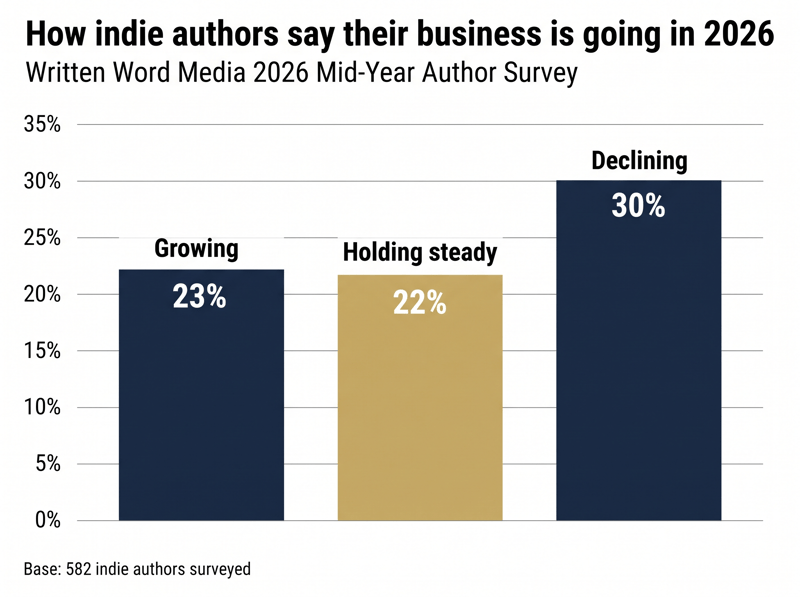
Those declines are not evenly spread, and the reason matters here. Authors who had built ad-dependent revenue were hit hardest when the ranking rules moved, because paid traffic pointed at a page that does not convert is now a liability rather than a shortcut. As the same survey reports, 51 percent of authors still expect income growth over the next 12 months. The ones holding steady are the ones whose listings do the selling.
What does a description that converts actually contain?
Five things, in roughly this order. This is not a fill-in-the-blanks template. It is a checklist for what has to be present before you hit save.
- A hook in the first one or two sentences that survives truncation on a phone||Genre and subgenre signalled in natural language, so Amazon and the reader both know what kind of book this is||The promise: emotional payoff and tropes for fiction, problem and transformation for nonfiction||Reader fit, stated plainly, in the shape of who this book is for||A short close that tells the reader what to expect without breaching Amazon's ordering and promotion rules
Written Word Media's A10 listing guidance gives a compact fiction example worth copying structurally: a slow-burn enemies-to-lovers romance set in a small coastal town, for readers who want sharp banter, family secrets and a hard-won happily ever after. Fifteen words in and you know the trope, the setting, the tone and the ending being promised.
The nonfiction equivalent swaps tropes for outcomes: a step-by-step guide that helps first-time indie authors publish a professional KDP book, optimise their Amazon listing and build a marketing plan that drives consistent sales. Same job, different vocabulary. Problem, audience, transformation.
"Amazon is getting better at matching books to reader intent, not just matching books to exact keywords." Written Word Media, How to Optimize Your KDP Book Listing for Amazon's New A10 Algorithm"
How do you write the first two lines?
Start with what is strange, specific or high stakes, and resist the urge to set the scene. Openings that lead with a place, a date or a character's full name are describing. Openings that lead with a problem or a contradiction are selling. Only one of those survives a reader who is three seconds into deciding.
- Cut character names the reader has no reason to care about yet||Cut world-building and geography that only makes sense after chapter three||Cut genre disclaimers such as this is not your usual thriller||Cut anything about you, your credentials or your process, unless the book is about you
A useful constraint: delete your first sentence and reread. If the description does not get worse, that sentence was throat-clearing, and it was occupying the only real estate every single reader sees.
Does your cover have to match your description?
Yes, and it is no longer just a style preference. Amazon's systems assess the cover image alongside the copy, and the A10 analysis notes that a cover signalling one reading experience while the description signals another depresses click-through and conversion together. A dark academia fantasy dressed as a light contemporary romance confuses the reader and the algorithm in the same instant.
The check is simple. Show your cover to someone unfamiliar with the book and ask them to name the genre. Then show them the first two lines of your description and ask again. If the answers differ, one of the two needs rewriting, and it is almost always cheaper to change the words.
How do A+ Content and reviews amplify the description?
Your description is the top of the page, not the whole page. Two elements sit underneath it, and both feed the same conversion signal that now drives ranking.
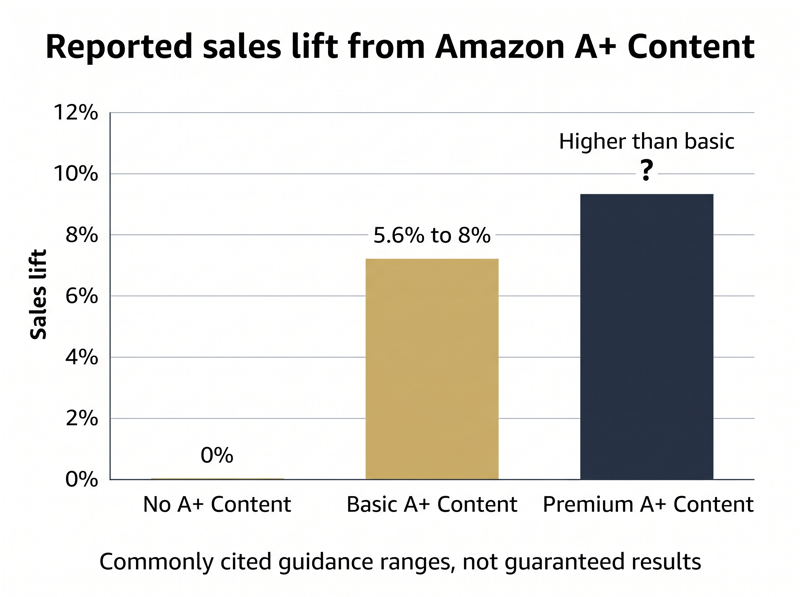
A+ Content is the enhanced visual section below the main description, documented on the KDP A+ Content help pages. It is where the editorial quotes Amazon bans from your description are permitted, and it lengthens the time a shopper spends on your page. Amazon and seller guidance commonly cite sales lifts in the range of 5.6 percent to 8 percent for basic A+ Content, with higher figures reported for premium formats.
Reviews do the other half of the work. Under the newer ranking behaviour, review text functions as metadata: the words readers use about pacing, tropes, mood and audience fit teach Amazon what your book is and who it suits. Written Word Media puts the meaningful threshold at around 50 reviews rather than the thousands authors imagine, and stresses velocity over volume. A book with recent, specific reviews looks active. A book with old, thin ones looks stale. Our guide to getting Amazon book reviews covers the mechanics.
How do you test a description without guessing?
Change one variable, wait, and read the numbers you already have. Amazon places no limit on description edits, which makes this the one part of your listing that genuinely supports a testing loop.
- Record a baseline before you touch anything: sessions or units over the last 30 days, plus KENP reads if you are in Kindle Unlimited||Rewrite only the first two lines and leave the rest of the description alone||Wait a full two weeks, so daily ranking updates and ordinary sales variance have time to settle||Compare the same length of window against your baseline before drawing any conclusion||Keep a dated log of every version, because without one you cannot tell which change produced which result
One caveat, stated plainly: unless you are sending steady, comparable traffic to the page, a description test on a low-volume title will not give you a statistically clean answer. Treat the result as a signal rather than a verdict, and when the data is ambiguous, ship the version that reads better to a human.
Frequently asked questions
A sharp description still needs reviews underneath it
Everything above assumes a reader has already landed on your page. Once they are there, the description does the persuading and the star rating does the reassuring, and only one of those is something you can write yourself. That is the gap most indie authors get stuck in: a listing that is finally sharp, sitting above four reviews.
Read and Rate was built to close it. You upload your manuscript and it is watermarked automatically before any reviewer downloads the file, so your book stays protected while it circulates. You choose which platforms you want reviews on rather than being tied to Amazon alone, reviewers can leave you private feedback that only you can see, and the community hub gives you somewhere to compare notes with authors solving the same problems. Start free and get reviews moving while your new description is still fresh.