How to Choose the Best KDP Categories for Your Book

Choose KDP categories with real data: skip the 27% that are ghosts, dodge duplicates, and target lists where 15 sales a day wins the bestseller tag.
Three picks against fourteen thousand options, and roughly one option in four is fake. That is the actual shape of the KDP category decision, and it explains why two authors with identical books can have completely different launches. One sits invisible at rank 200,000 in Contemporary Fiction. The other carries an orange Best Seller tag in a category where fifteen sales a day is enough to take the top spot.
This guide is built on Kindlepreneur's category selection research, the most thorough public dataset on how Amazon's category system actually behaves, combined with Amazon's own published rules. It pairs with our guide to KDP keywords and categories, which covers what the 10 metadata slots are; this one covers how to win the 3 category slots specifically.
Why do categories decide whether your book gets seen?
Every book on Amazon carries an Amazon Best Sellers Rank, recalculated roughly every two hours from recent sales. An ABSR of 1,000 means 999 books in the entire store are currently selling better than yours. Ranking against the whole store is a losing game for almost everyone, which is exactly why categories matter: a category is a smaller store, with its own bestseller list, where your book only has to outsell the books on that one shelf.
Land in the top of a category and two things happen. Your book appears on that category's browse page, in front of readers who are actively shopping that shelf. And at number one you earn the orange Best Seller tag, which follows your book around the store and does quiet conversion work on every page where your cover appears. Readers trust the tag because Amazon awards it, not you.
How many categories do you actually get?
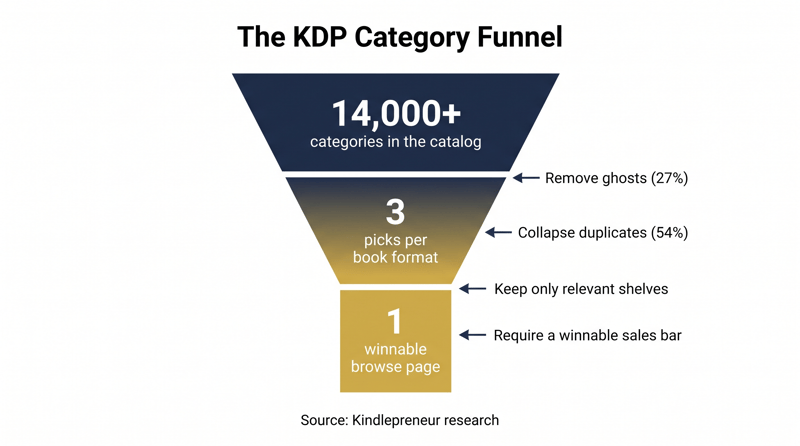
Three, chosen in the KDP dashboard, per book format. Amazon's KDP Categories help page is the authority here, and it also reserves Amazon's right to move your book if it decides your placement is inaccurate. So the real question is not how to get more slots. It is how to stop wasting the three you have, because the catalog you are choosing from is in worse shape than it looks.
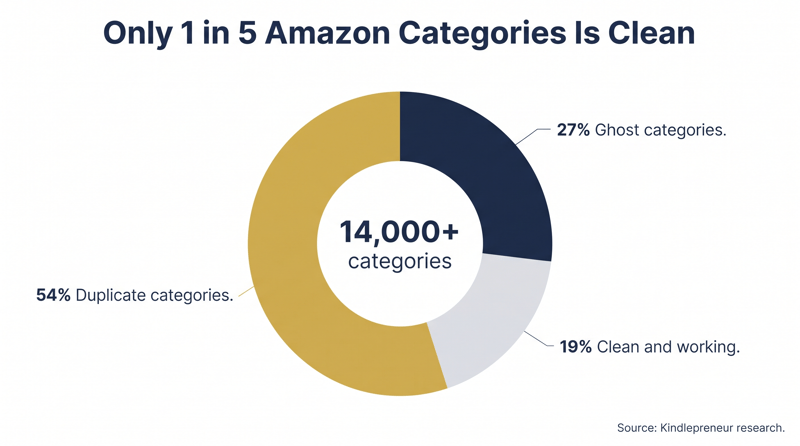
Read that again from the perspective of your three picks. Choose casually and you can select a ghost, a duplicate of your own other pick, or both, and Amazon will not warn you. Your book publishes, looks categorized, and quietly competes in fewer real categories than you paid for with your slots.
What are ghost categories and how do you spot them?
A ghost category exists in KDP's selection tree but has no working browse page in the store. No browse page means no shelf for readers to walk, no bestseller list, and no orange tag to win. Your book is filed in a room no customer can enter. By Kindlepreneur's count that describes about 1 in every 4 categories Amazon offers you.
The manual test is simple: take the full category path you are considering and walk it yourself in the Amazon store, click by click, from the Kindle Store down to the final subcategory. If you cannot reach a real browse page with a bestseller list at the end of the path, it is a ghost. Do the walking in the store itself, not in KDP's category picker: the picker generates dynamic pages that will not tell you whether the public shelf exists.
Why do duplicate categories waste your picks?
Amazon's catalog reaches the same shelf through different paths. Kindle eBooks > Mystery and Books > Mystery can be two strings pointing at one browse page, and Kindlepreneur's data says 54% of all categories are duplicates of this kind. Pick two strings that resolve to the same shelf and you have spent two of your three slots to be on it once.
KDP gives you one free signal here: inside the category picker, selecting one member of a duplicate group greys out the others. If a category you wanted becomes unselectable after a pick, you just learned those two were the same shelf, so spend the freed slot somewhere genuinely different.
How do you measure whether you can win a category?
Competitiveness is measurable, and the yardstick is the current number one book. Its Best Sellers Rank tells you, through a sales calculator, roughly how many copies a day the top spot costs. The procedure:
- Open the browse page of each category you are considering and note the current number 1 book||Record that book's Amazon Best Sellers Rank from its product page||Convert the ABSR to estimated daily sales with a sales calculator, such as Kindlepreneur's free Kindle sales rank calculator||Compare that number to what your launch can realistically produce per day, and keep the categories where the two meet
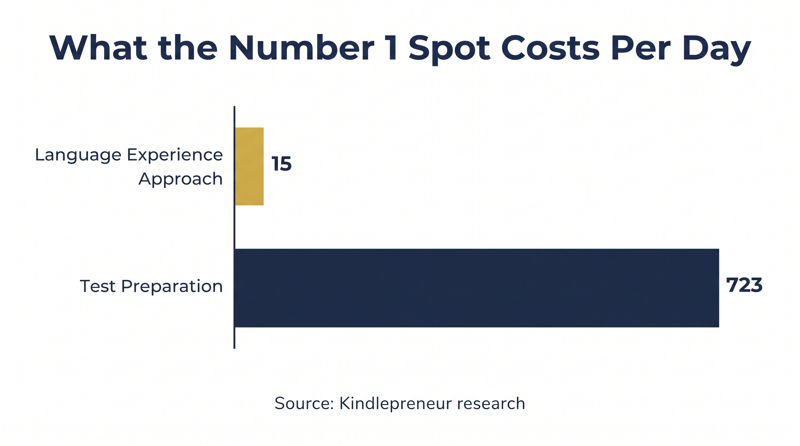
Because ABSR refreshes roughly every two hours, even a short concentrated sales push can take a winnable category's top spot, which is why launch weeks and review momentum matter so much. If number 1 is out of reach, the top 20 is still worth aiming for: that is what places your cover on the category's browse page where shoppers scroll.
What is the right three-category strategy?
Relevance comes first, before any competitive math. A thriller filed under Cooking might find a soft list to top, but the readers browsing that shelf will never buy it, Amazon's algorithm reads the mismatch, and its metadata policy treats deliberate miscategorization as a violation. Within relevant options, Kindlepreneur's playbook is:
- Niche down: drill into subcategories, because competition thins with depth and your book is automatically included in every parent category above your pick||Spread your three picks across a broad array of reader interests rather than three near-identical shelves||Make at least one pick a category your realistic daily sales can actually win, using the number 1 benchmark above||Treat the top 20 of a bigger relevant category as a legitimate target: browse-page visibility compounds daily
A useful sanity check for each final pick: is it real, is it relevant, can I reach its top 20 within launch month? Three yes answers, three times over, and your slots are working. Your book description then has to convert the browsers your categories bring in; our guide to writing an Amazon book description that sells covers that half of the page.
How do keywords keep you in the right category?
Categories and keywords are one system wearing two interfaces. Amazon's algorithm cross-reads them, and when they disagree, the algorithm wins, as the warning above explains. The practical rule from Kindlepreneur's research: dedicate 1 or 2 of your 7 keyword fields to phrases that describe your chosen categories in the language Amazon expects for them. The other 5 or 6 slots do search work, covered in detail in our KDP keywords and categories guide, including the 5 keyword types Amazon officially recommends and the 12 patterns that get books rejected.
Which tools do the category research for you?
Everything above can be done by hand for free: walk the paths, note the number 1 ranks, run the calculator. Budget an afternoon for it. Publisher Rocket, Kindlepreneur's own tool at a one-time $199, automates the same research: it flags ghost categories, marks duplicate groups with their alternate strings, and shows the estimated sales needed for number 1 and the top 10 in each category. BookishNerd offers a free category checker if you have your ASIN. The tools save time; the method is identical, so nothing stops you from starting manual and upgrading only if you publish often.
Frequently asked questions
The right category gets you seen. Reviews get you chosen.
Category strategy puts your cover on a shelf readers actually browse, and the two-hour ABSR cycle means a burst of launch sales can take a winnable list quickly. But a shopper who taps your cover decides on what they find there: the description, the rating, and above all the reviews. A number 1 spot above a page with three reviews leaks buyers to the book below it with two hundred. Reviews are also part of the sales momentum that ABSR measures, so they feed the very rank your category strategy depends on; our guide on getting more Kindle book reviews breaks down that loop.
Read and Rate exists for exactly that second half. You list your book, real readers choose it themselves, every copy they download is watermarked, and every review is read by a human before it reaches your book. No review swapping, ever. The result is the review base that makes a category win convert, and that keeps converting after launch week ends.