Amazon Review Requests Ads: What Authors Should Know

Amazon Review Requests ads ask your book's buyers for ratings. See who qualifies, what each rating costs, the 1-star risk and a simple test plan for authors.
On September 29, 2026, Amazon Ads announced Review Requests, an ad that asks recent buyers for a star rating or written review. Products qualify only while they have fewer than 1,000 total ratings and reviews, and the US open beta was scheduled for late October 2026. By November 19, KDP author Dale L. Roberts reported that the option had appeared in his own advertising dashboard, that he had launched a campaign for one of his books, and that the minimum bid he saw was $2.
This is the first time Amazon has offered authors a paid, Amazon-run way to ask readers for reviews. It sits right next to everything we cover on Amazon review rules for authors and on how many reviews a book needs to sell, so it deserves a careful look before you spend a dollar on it. Below is what Amazon has confirmed, what is still unclear, and a simple test to decide whether it fits your book.
What are Amazon Review Requests ads?
Review Requests is a new Amazon Ads format. Instead of showing your book to new shoppers, it shows a small card to people who already bought it, asking them to leave a star rating with one tap or to write a review, with an optional photo or video. According to PPC Land, which covered the Amazon Ads API release note, the card is headed "How was your item?" and the audience is defined as verified purchasers.
Amazon pitches it as a faster path to the reviews that customers would leave anyway. The launch page says the ads deliver the "same authentic reviews customers already leave," just more of them and sooner. Nobody is paid to write anything, and nothing is offered to the reader in exchange. The money goes from you to Amazon for the placement.
For authors, the important point is who sees the card. It never reaches new readers. As indie author and former Amazon product manager Janet Margot puts it in her own test write-up, only people who already bought your book will see the card. That shapes everything else in this article.
Who can use Review Requests, and where?
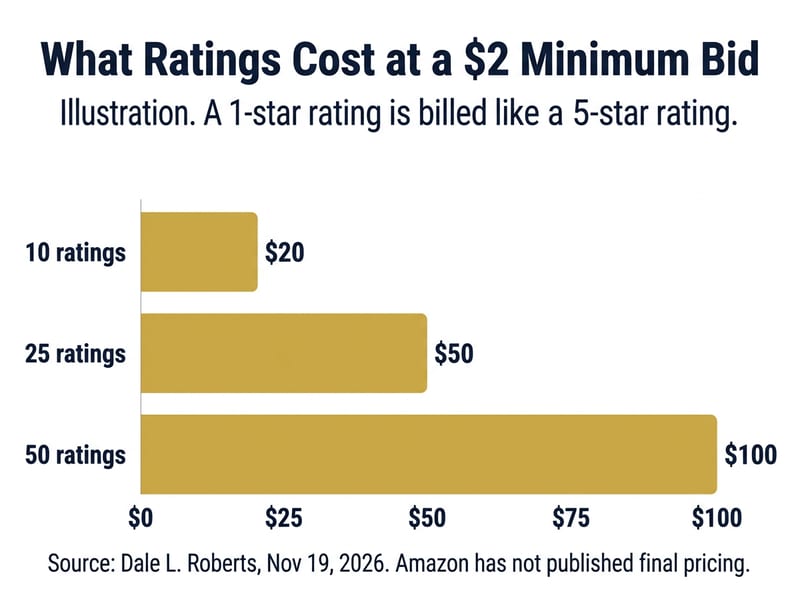
Amazon's launch announcement lists three conditions. The advertiser must be a registered seller or vendor with an advertising account in good standing and no active policy violations. The product must have fewer than 1,000 total ratings and reviews. And the marketplace must be the United States, with other marketplaces "planned for future releases" and no dates given.
KDP authors are the grey zone. PublishFlow's October analysis said Amazon's announcement did not mention KDP authors at all, and that ebooks and Kindle+ (formerly Kindle Unlimited) titles were unclear. A month later, Dale L. Roberts wrote that he had "confirmed the feature is available to me as a KDP author." The likely reading: access is rolling out account by account during the beta, so some authors see it and others do not yet.
- Market: United States only during the beta||Product cap: fewer than 1,000 total ratings and reviews, checked at launch and while running||Account: an advertising account in good standing with no active policy violations||Format: managed in the Amazon Ads console and through the Amazon Ads API||KDP: not named by Amazon, but at least one KDP author reports access in his dashboard
How much does a rating cost, and what are you charged for?
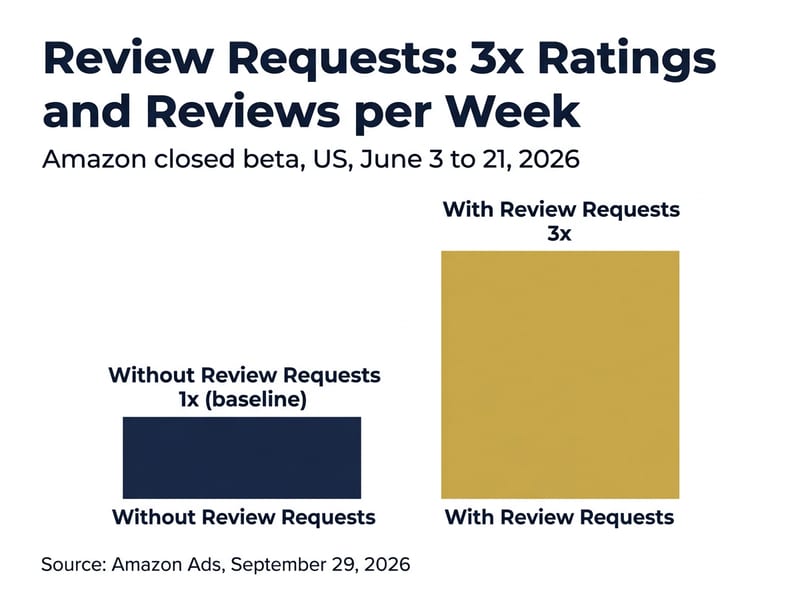
This is the least settled part of the program, and three sources describe it three ways. Amazon's September page said only that campaigns use "the same bidding and budget controls" as other Amazon Ads campaigns. The Amazon Ads API release note covered by PPC Land on November 12 says the advertiser "pays only when a shopper leaves a rating or review." Yet the Support Center pages updated on November 16 list cost per click as a campaign metric, as PPC Land reported on November 17.
What authors are seeing in practice is closer to the API wording. Dale L. Roberts reported a minimum bid of $2 in his dashboard and wrote that you are charged whenever a customer submits a rating or review, regardless of whether it is positive or negative. A one-tap star rating counts just as much as a written review.
Amazon has not published a price list, a cost per review benchmark, or how the bid behaves in an auction. Until it does, the honest way to budget is to treat the bid as the likely cost of each rating and cap the campaign hard.
When does a reader see the review request?
Amazon's Support Center pages, quoted by PPC Land, say targeting starts 7 days after delivery and continues up to 150 days after delivery. There is no manual targeting: you cannot pick readers, keywords, or genres. Each campaign holds one ad group, you choose the products, set a single default bid and a daily budget, and Amazon says a new campaign can take up to 1 hour to process before it can receive impressions.
For books, that window raises a timing question that sellers of phone cases never face. A buyer of a 400-page fantasy novel may not have finished it by day 7, and a reader who is asked to rate a book they have barely started may skip the card or rate on first impressions. The long tail of the window helps here, because the card can keep appearing for months.
How this window applies to ebooks, Kindle+ borrows and audiobooks has not been spelled out. Amazon's pages talk about delivery, which is clear for paperbacks and hardcovers, and PublishFlow lists ebook and subscription treatment as open questions.
Is the 3x claim reliable?
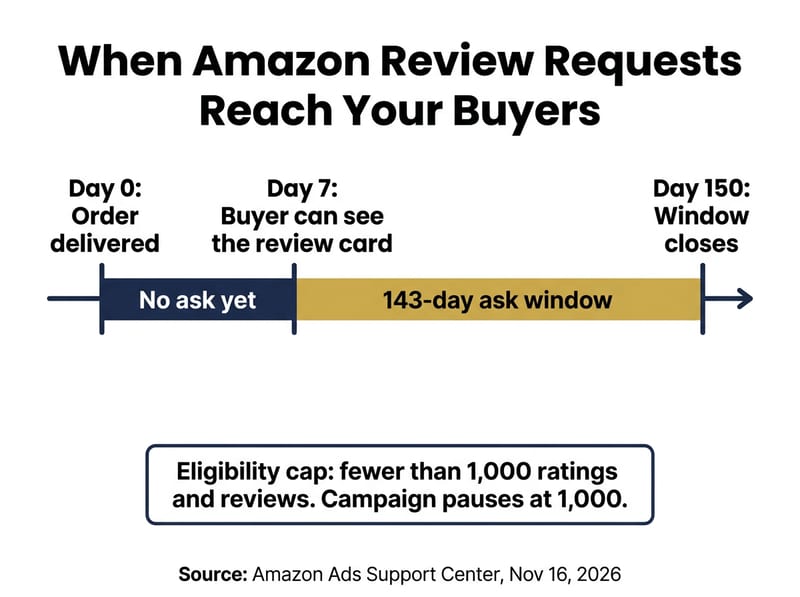
The headline number deserves a careful read. Amazon's 3x figure comes from a closed beta in the US that ran from June 3 to 21, 2026, which is 19 days. As PPC Land noted in October, Amazon disclosed no sample size, no category mix, no baseline, no spend level, and no control group, and it did not say whether the share of positive and negative ratings changed.
Two more things matter for authors. First, a multiplier is only as good as the starting point. A book that earns one rating a week could, on Amazon's numbers, reach three. A book that sells two copies a month has almost no buyers to ask. Second, the beta was run across products in general, not books specifically, and reading takes longer than unboxing a kitchen gadget.
None of this means the number is wrong. It means you should treat 3x as Amazon's best case and measure your own result against your own baseline, which is exactly what the test plan later in this article does.
How does it compare with Vine, Request a Review and reader platforms?
Amazon now has several ways to encourage reviews, and they are built for different situations. Canopy Management compared the seller tools side by side in October. The table below adds the option most self-published authors actually rely on: putting the book in front of readers who choose to read and review it.
OptionWhat it costsWho gets askedBest forReview Requests (Amazon Ads beta)Bid per rating or review; $2 minimum reported by one KDP authorVerified buyers, day 7 to day 150 after deliveryBooks already selling steadily with under 1,000 ratingsRequest a Review button (Seller Central)FreeOne buyer per order, 5 to 30 days after delivery, per CanopySellers who fulfill orders through Seller CentralAmazon Vine$0, $75 or $200 per parent product, per CanopyVine reviewers, for products with fewer than 30 reviewsBrands with a Brand Registry roleReader review platforms and ARC teamsVaries by platform, often a subscriptionReaders who choose your book before or after launchNew releases with zero or few reviews
The difference that matters most is the cold start. Review Requests needs buyers. A new release with no sales and no reviews has nobody to ask, and Amazon previously recommended that products have at least 15 reviews and a 3.5-star average to be considered retail ready for advertising, as Dale L. Roberts noted. That first group of honest reviews still has to come from somewhere else, such as a street team, ARC readers or a reader community.
Is paying Amazon for review requests allowed?
Yes, because the payment goes to Amazon for ad placement, not to the reviewer, and the reader is free to leave any rating or none. That is the line the US Federal Trade Commission draws. Its final rule announced on August 14, 2024, approved by a 5-0 vote, bans compensation or incentives conditioned on a review expressing a particular sentiment, positive or negative, and bans buying fake reviews.
So Review Requests itself is not a rules problem. What you combine with it can be. Do not message buyers offering refunds, gifts or bonus content for a rating, do not ask friends and family to watch for the card, and do not try to steer the campaign toward happy readers. Our guide to Amazon review rules for authors covers the rest of the boundaries.
Should you try Review Requests on your book?
For most self-published authors the answer depends on where the book sits today. Here is a simple way to decide.
When it makes sense
- Your book sells consistently, for example several paperback sales a week, so there are real buyers to ask||It already has an honest base of reviews and a rating you are comfortable defending||Your sales come mostly from readers who found you on Amazon, so they are not already on your email list||You run Amazon Ads already and can watch spend daily
When to wait
- The book is new, has few or no sales, or has no reviews yet||Readers have flagged fixable problems: formatting, typos, a cover or blurb that sets the wrong expectations||Your budget cannot absorb paying for ratings that may be negative||Your sales are mostly ebooks or Kindle+ reads, where Amazon has not explained how delivery timing works
A 5-step test plan for authors
If you have access and your book fits the first list, run a short, controlled test rather than an open-ended campaign. Our Amazon Ads guide for authors covers the console basics; the steps below are specific to Review Requests.
- Record your baseline: count new ratings and reviews per week over the last 4 weeks, and note your average star rating||Pick one book with steady sales and a solid rating, and put only that book in the campaign so the results are clean||Set the lowest bid the console allows and a small daily budget, then write down the total you are willing to spend on the test||Run it for 3 to 4 weeks, checking the campaign metrics Amazon shows: rating-only reviews, written reviews and average star rating||Compare the result with your baseline: new ratings per week, average rating, and cost per new rating. Keep going only if the rating held and the cost per rating fits your royalty
The last step is where many authors will find the answer. If a paperback earns you a few dollars in royalty and each rating costs $2 or more, the ad only pays off if the extra ratings measurably lift conversion on the product page. Your own numbers, not Amazon's 3x, should decide.
What this changes for your review strategy
Amazon is now monetizing the gap between buyers and reviewers, which tells you how much it values ratings in its own store. Amazon's advertising business is large and growing: PPC Land reported Amazon's third-quarter 2026 ad revenue at $19.64 billion, up 11 percent. Review Requests adds a new line to that business, and it will likely expand to more marketplaces once the beta ends.
For self-published authors, the practical lesson is that reviews now come from three places, and each has a job. Readers you recruit before and after launch build the first honest base. Your existing buyers, whether reached through your back matter or now through Review Requests, add steady volume. And handling the occasional critical review well, as we explain in our guide to negative book reviews, protects the rating you worked for.
Frequently asked questions
The bottom line for self-published authors
Review Requests is a useful new tool with a narrow sweet spot: books that already sell, already have honest reviews, and can afford to pay for every rating, good or bad. It does nothing for a launch, and it rewards books that are ready to be judged. Test it small, measure against your own baseline, and keep building the reader relationships that produce reviews before the ads ever start.
That first wave of reviews is where Read & Rate helps. Our community puts your book in front of real readers, lets you choose where you want reviews, from your preferred Amazon marketplace to Goodreads, Barnes & Noble, Apple Books, Google Books and custom links, protects every PDF with an automatic watermark, and gives you a private comment from each reviewer. Start with the free trial and build the base that makes every other review tool work better.