KDP Keywords and Categories: How to Rank Your Book (2026)

Amazon gives every book 3 categories and 7 keyword slots. Here is how to fill all 10 with terms readers actually search, based on KDP's own published rules.
Ten slots. Three categories and seven keyword fields, per book format. That is the entire surface area you control on Amazon's discovery engine, and Amazon publishes the rules for all ten on help pages most self-published authors never open. According to Amazon KDP's official keywords documentation, relevant keywords can boost your placement in search results alongside factors like sales history and Amazon Best Sellers Rank. That is Amazon stating plainly that metadata moves rank.
Most authors fill those ten slots the way they fill any form: fast, from memory, using words that describe the book to themselves rather than words a stranger would type into a search box. A fantasy author types fantasy into a keyword field when fantasy is already their category. A memoirist types inspiring true story, which nobody searches. Both have spent slots they will not get back until they edit and republish. This guide walks the ten slots one at a time, using Amazon's published rules rather than folklore from author forums.
What do KDP keywords and categories actually do?
They tell Amazon where to shelve your book and which searches it should answer. Amazon's KDP Categories help page describes categories as digital shelves that work the same way sections do in a physical bookstore, and states that categories, along with the keywords you select, tell Amazon where to place your book in its store. The two systems are not alternatives. They are two halves of one instruction.
Categories handle browsing. A reader clicking through the Kindle Store into Historical Fiction is walking a shelf, and your category placement decides whether you are on it. Keywords handle searching. A reader typing Victorian London murder mystery into the search bar is describing a book, and your keywords decide whether Amazon thinks you match. Different readers, different behaviour, different slots.
- Categories place your book on browsable shelves and make it eligible for bestseller rank inside them||Keywords match your book to typed search queries, including phrases far too specific to be a category||Keywords can also influence shelving when the category picker has no good fit, because Amazon uses them to decide placement||Both are metadata, both stay editable after publishing, and neither requires you to touch your manuscript
How many categories and keywords do you actually get?
Three categories and seven keywords, per format. The category number is the one that trips up authors returning after a break. Amazon states directly that you select three categories when creating a book in KDP. The older route, where you emailed KDP support and asked to be added to up to ten Amazon-specific categories, no longer exists. Amazon moved category selection into the dashboard and stopped accepting requests to add categories on your behalf.
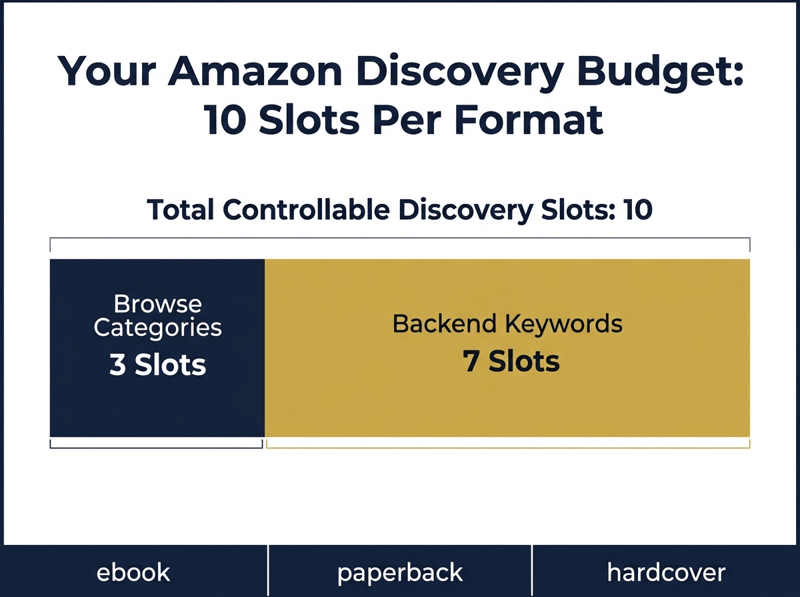
Seven is the keyword number, and Amazon phrases it as up to seven keywords or short phrases. Each field takes a phrase, not just a single word, and Amazon's Metadata Guidelines for Books recommend phrases of two to three words for best results. Amazon does not publish a character count for the field, only an instruction to keep an eye on the character limit shown in the text box, so write the phrase and let the field tell you when to stop.
Why does Amazon metadata matter more than site SEO?
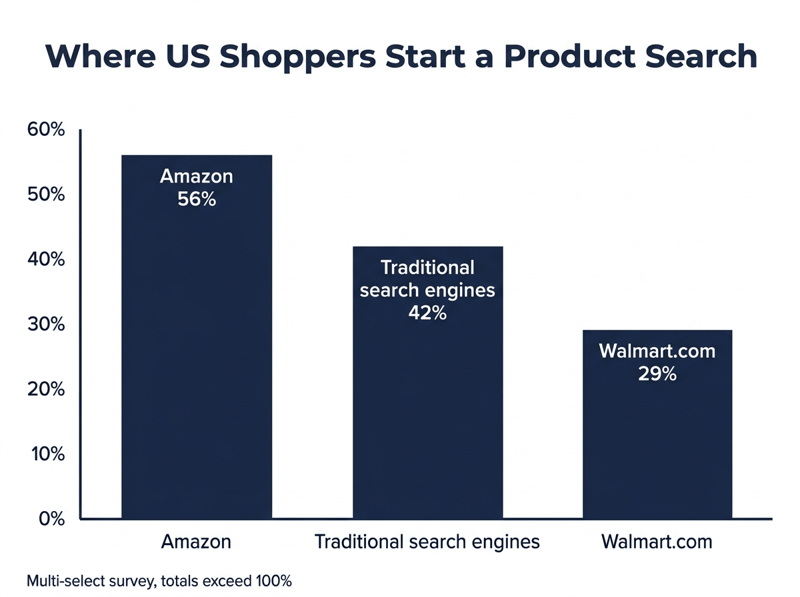
Because book buyers do not start on Google. A 2024 Jungle Scout survey of United States online shoppers, reported by Search Engine Land, found 56 percent begin product searches on Amazon, compared with 42 percent on traditional search engines and 29 percent on Walmart.com. Respondents could name more than one starting point, which is why the figures pass 100, but the ordering is what matters. For a product that lives almost entirely inside one store, that gap decides where your optimisation effort belongs.
This does not make your author website wasted effort. It means the ten metadata slots inside KDP are the highest-leverage half hour in your entire launch, and they cost nothing but attention. A reader who has never heard your name can still find your book through a category shelf or a search phrase, then decide based on what our guide to getting Amazon book reviews calls the only signal on the page written by someone with nothing to sell. Metadata is the only free discovery Amazon hands you.
How do you choose your three KDP categories?
Amazon publishes three principles for this, and they are more useful than they look. Research your genre by seeing where comparable books are shelved. Pick accurate categories, because irrelevant ones create a poor shopping experience. Balance popularity against relevance, aiming for categories with genuine reader interest but not so broad or so narrow that your book disappears. Everything below is execution on those three.
- Open the Kindle Store or Books store for your primary marketplace and browse the category tree yourself. Amazon links the full tree for every marketplace from its categories help page||Find five to eight books a reader would consider interchangeable with yours, then check which categories each one sits in||Note the Best Sellers Rank of the book sitting around position 20 in each candidate category. That number tells you roughly what daily sales it takes to stay visible there||Pick one category where you can realistically reach the first page, and two where you have genuine long-term ambition||Set your Primary Audience and Primary Marketplace before you open the category picker, because both change which categories Amazon offers you
That fourth step is where most authors fail, in one of two directions. Aim only at broad categories and you rank nowhere. Aim only at tiny ones and you rank first on a shelf nobody browses. A mix buys you an early visible win plus room to grow as your sales history builds, and sales history is a ranking factor Amazon names explicitly, so the two compound. If you are still deciding which formats to publish, our comparison of IngramSpark and KDP Print matters here too, because every format you add is another three categories and seven keywords you get to aim.
How do you fill your seven keyword slots?
Start with what Amazon says belongs there. The KDP keywords page lists five useful keyword types, and every one of them is something that will not fit in your title or your categories: setting, character types, character roles, plot themes, and story tone. Amazon supplies its own examples for each, including Colonial America for setting, single dad or veteran for character types, strong female lead for character roles, coming of age or forgiveness for plot themes, and dystopian or feel-good for story tone.
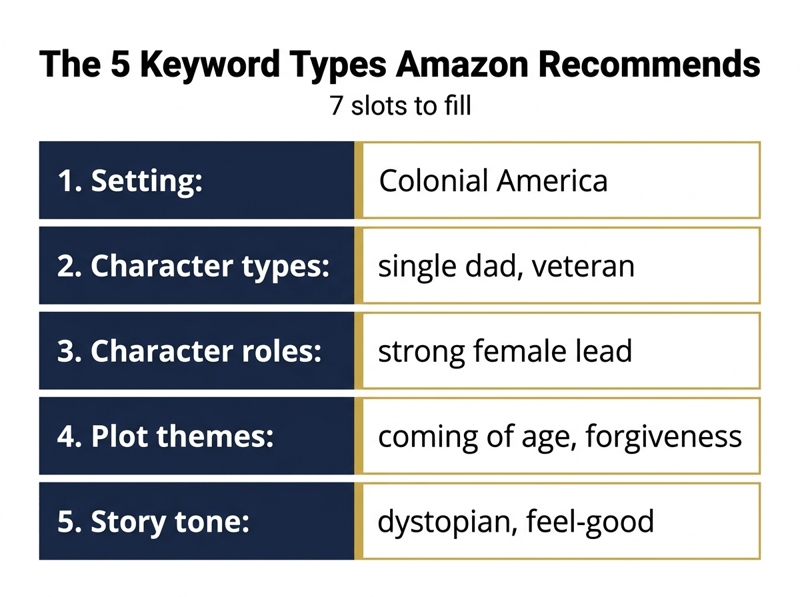
- Slots 1 to 5: one each for setting, character type, character role, plot theme, and story tone||Slot 6: a reader-intent phrase describing the situation someone is shopping for, such as cozy mystery small town bakery||Slot 7: a trope or sub-genre phrase your category tree does not cover||Combine words in the order a customer would say them. Amazon's own example is that people search military science fiction, never fiction science military
With five recommended types and seven slots, you have two spare fields. Spend them on reader-intent phrases, the miniature sentences people actually type. Someone hunting a comfort read types cozy mystery small town bakery, not mystery. Someone buying a gift types books for women who love travel. These phrases are too specific to be categories and too long for a title, which is precisely why the keyword field exists.
Do not use quotation marks. Amazon is specific about this: if you enter a phrase in quotes, only people who type all of those words will find your book. Enter complex suspenseful whodunit without quotes and a customer can search any of those words and still reach you. Quotation marks collapse a slot down to one query, which is the opposite of what you want from seven of them.
Which keywords will get your book rejected?
Amazon publishes a list, and it is longer than most authors expect. Twelve patterns appear on the keywords help page as things to avoid, and the Metadata Guidelines for Books repeats several of them as outright prohibitions. Read them once and you will probably find you were planning to break at least two.
- Anything already covered elsewhere in your metadata, including your title and contributors||Words already used in your book categories, such as 19th Century History when that is your category||Subjective quality claims like best novel ever||Time-sensitive statements such as new, on sale, or available now||Terms common to almost every item in the category, such as the word book||Spelling errors, which do not help you catch typo searches||Variants of spacing, punctuation, capitalisation, or pluralisation, since Amazon already treats computer and computers as the same||The name of any author not associated with your book, which Amazon treats with zero tolerance||Brands you do not own or are not authorised to use||Quotation marks around your search terms||Amazon program names such as Kindle Unlimited (now Kindle+ since October 22, 2026) or KDP Select||HTML tags of any kind
How do you find terms readers actually type?
Amazon tells you to test candidate keywords in its own search bar before you publish, and to read the suggestions that drop down as you type. Those suggestions are generated from real customer queries, which makes the Amazon search box the only free keyword research tool with first-party data behind it. Use it before you pay for anything else.
- Type your candidate phrase into the Amazon search bar and read every autocomplete suggestion, then repeat with each suggestion as a fresh seed||Run the search and judge the first page. If the results are not books like yours, the phrase is wrong for you no matter how good it sounds||Read the Also Bought and Customers Also Searched sections on the detail pages of your five closest comparable titles||Mine your own reviews and reader emails. The words readers use to describe your book to each other are the words they will type||Check the Look Inside samples and back cover copy of comparable titles for sub-genre vocabulary that never made it into a category name
One caution on where you put those terms. Amazon reminds authors that customers skim past titles longer than 60 characters, so do not try to solve keyword coverage by stuffing your title and subtitle. Policy caps the two together at 200 characters, but the practical limit is far shorter, and Amazon's book description guidelines separately ban keyword phrases from the description field. The seven backend slots exist so you do not have to contaminate the copy readers see.
How do you test and update metadata after publishing?
Treat the ten slots as a hypothesis, not a decision. Amazon states that you can change keywords and descriptions as often as you like, and that category changes take up to 72 hours to display in the store. That combination gives you a clean testing loop with a known cycle time and no cost, which is rare in book marketing.
- Publish with your best guess, then wait for the change to propagate. Allow the full 72 hours for categories before you conclude anything||Search your own keyword phrases on Amazon and record where your book appears, or whether it appears at all||Change one variable at a time. Swapping all seven keywords at once tells you nothing about which one worked||Give each test at least two weeks, because search placement also reflects sales history and Best Sellers Rank, and those move slowly||Keep keywords and description consistent across your ebook, paperback, and audio editions, which Amazon recommends explicitly
"Along with factors like sales history and Amazon Best Sellers Rank, relevant keywords can boost your placement in search results on the Amazon Store." Amazon KDP, Make Your Book More Discoverable with Keywords"
Read that sentence carefully, because it also names the ceiling. Keywords work alongside sales history and Best Sellers Rank, not instead of them. Perfect metadata puts your book in front of the right reader; what happens next depends on your cover, your description, your price, and the review count sitting under your title. Our guide to the seven vital metrics indie authors should track covers what to measure once discovery starts working.
Frequently asked questions
Metadata gets you found. Reviews get you bought.
Ten well-chosen slots put your book on the right shelf and in the right search results. They do not close the sale. A reader who lands on your detail page scans three things in seconds: the cover, the first line of the description, and the star rating with its review count. Two of those are yours to design. The third has to be earned, and an empty review count quietly undoes every hour you spent on keyword research.
Read and Rate exists to close that gap. You upload your manuscript, it is watermarked automatically before any reviewer downloads it, and you choose which platforms you want reviews on rather than being locked to Amazon alone. Reviewers can leave you private feedback that only you can see, which is often more useful than a public star rating while you are still tuning metadata. Behind that sits a community of self-published authors trading what is working right now, not what worked three algorithm updates ago.