KDP Pre-Orders: 7 Rules After the September 2026 Update

Set up KDP pre-orders under the September 2026 rules: 18-month window, 72-hour deadline, postponement limits, penalties, and proven ways to promote them.
What is a KDP pre-order and who should use one?
A KDP pre-order lets readers buy your Kindle eBook before it exists on their device. According to KDP's release options page, your Amazon detail page goes live as soon as the pre-order passes review, and customers can start ordering right away. On release day, the book is delivered automatically to everyone who ordered it.
KDP's Kindle eBook Pre-Order help page adds the detail that matters most for launch strategy: pre-orders contribute toward sales rank and Kindle Store merchandising before your release. In other words, a pre-order is not just a waiting room. It is a chance to build visibility before launch day.
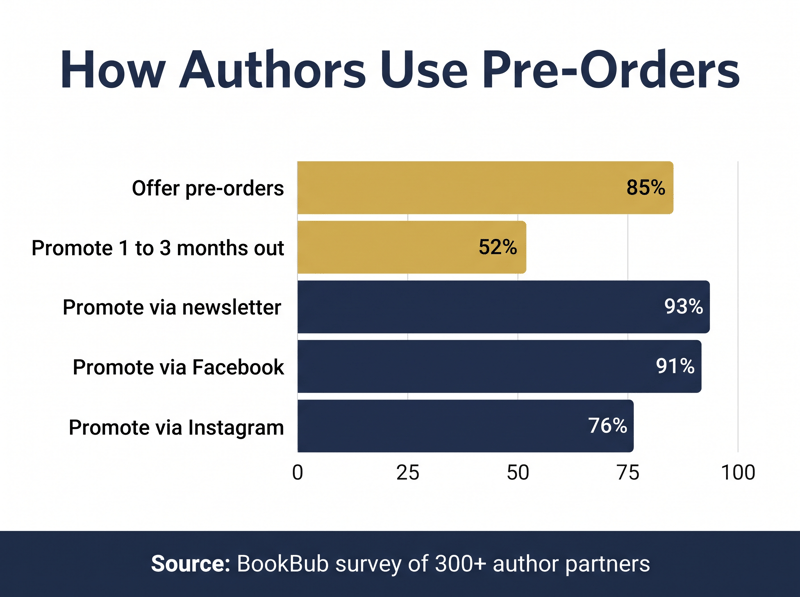
Pre-orders are not only for big names. In a BookBub survey of more than 300 author partners, 85 percent said they always or sometimes make books available for pre-order, and 72 percent of respondents were self-published. If you have a finished or nearly finished manuscript and a readership you can reach by email or social media, a pre-order is worth considering. If you are still drafting with no firm end date, the deadline rules below make it risky.
What changed in KDP pre-orders in September 2026?
KDP's rules changed for every Kindle eBook pre-order created on or after September 2, 2026. The SelfPub newsletter's summary and KDP's own help pages line up on the key points: a longer runway, more room to delay, and a gentler penalty for a single mistake.
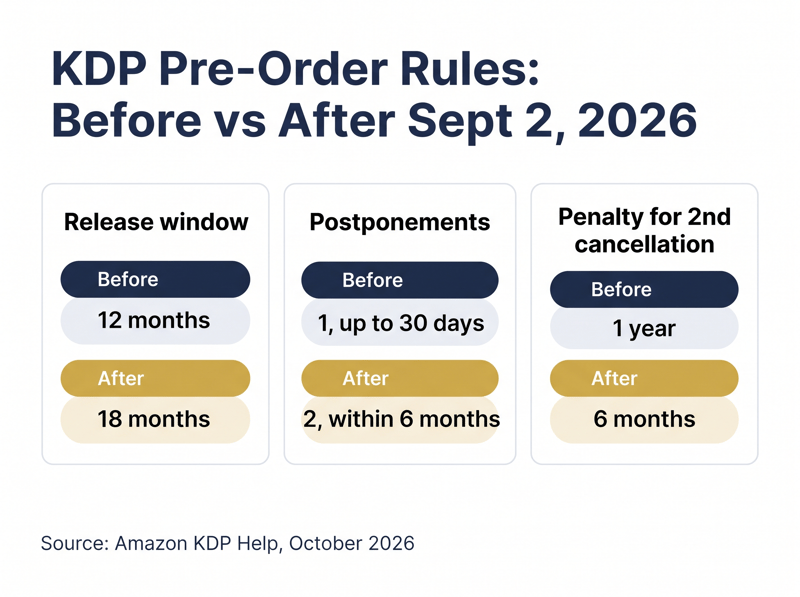
The old rules still apply in two cases. Pre-orders created before September 2, 2026 keep their original limits: a 12-month window and one postponement of up to 30 days. And if KDP removed your pre-order privileges before that date, the original one-year penalty still runs its course. Everything else in this guide covers pre-orders created under the new rules.
Rule 1: Only Kindle eBooks can go on pre-order
KDP's help page is explicit: pre-orders are available for eBooks only, not paperbacks or hardcovers. Print books use a different option called Schedule a Release, which lets you set a future release date but does not let customers order early. As the Indie Author Blueprint notes, you can still order author copies of a scheduled print book, but the public cannot see or buy it until release.
Two more eligibility limits apply. The book must be a new publication that meets KDP's content guidelines, and public domain eBooks are not eligible. If your launch plan depends on print pre-orders, you will need a channel outside KDP, such as selling direct from your own site.
Rule 2: You can set a release date up to 18 months ahead
Under the new rules, you can schedule a Kindle eBook release up to 18 months out, and you can have up to 10 active pre-order titles at a time. That is a big jump from the old 12-month window, and it opens the door to series planning: you could list book two while book one is still climbing the charts.
Longer is not automatically better, though. A pre-order that sits for a year can lose momentum, and every month adds risk of a delay. The BookBub data later in this guide shows most authors keep their promotion window much shorter. Use the 18-month ceiling as flexibility, not as a target.
Rule 3: The 72-hour final manuscript deadline is absolute
This is the rule that ends pre-orders. KDP says you need to upload and submit your final manuscript at least 72 hours before your release date. A timer on the setup pages shows exactly when that deadline falls. If you miss it, KDP cancels the pre-order, cancels every customer order after notifying the buyers, and counts the miss against your account.
Until that deadline, you can update your title, description, categories, keywords, manuscript file, and cover. Once you submit, changes are blocked for up to 72 hours while KDP reviews the file. If the book fails review, you revise and resubmit, which eats into your buffer. Build in at least a week of margin, not three days.
Upload a file you are proud of, even early on. The Indie Author Blueprint points out that pre-orders can now show a Look Inside sample, and that the manuscript you submit should be the version you want customers to receive, since buyers may preview it. A rough draft with placeholder chapters is a poor first impression. Walk through KDP's pre-order setup steps and remember the final click: until you select Submit for pre-order, your book stays in Draft status.
Rule 4: You get two postponements, within six months
Life happens, and the new rules allow for it. According to KDP's postpone or cancel help page, pre-orders created on or after September 2, 2026 can be postponed up to two times, and the new date cannot be more than six months from the original release date. Customers who pre-ordered are notified of the new date automatically.
Two cautions. Postponements must be made before the 72-hour submission deadline. And if you exceed the allowed postponements, KDP auto-cancels the pre-order, which counts toward your cancellation history. Moving a release date earlier is a different matter: KDP allows it once your final manuscript has been submitted and reviewed.
Rule 5: Your first mistake is forgiven, your second costs six months
KDP now tracks missed deadlines and cancellations at the account level. The first one is a one-time courtesy: your pre-order privileges stay intact. The second removes your pre-order privileges for six months across your entire catalog, after which they are restored automatically. During that time you cannot create or postpone pre-orders, although you can still publish books without one.
A cancellation also has permanent effects on that title. KDP says that after you cancel, the same ASIN cannot be used for a new pre-order and the title cannot be edited further. Customers are notified and their orders are canceled, which can cost you goodwill with your most eager readers. Treat your courtesy as an emergency reserve, not a planning tool.
Rule 6: Price cuts apply to everyone, price increases do not
KDP lets you change your list price at any time during the pre-order period, and its pre-order pricing and reports page explains how buyers are protected. If you lower the price, customers who already pre-ordered are charged the lower price. If you raise it, earlier customers keep paying the lower price. Your royalty is based on the price Amazon actually charges.
There is one important exception. These rules do not apply on Amazon.de or Amazon.in. On Amazon.de, raising the price during the pre-order period cancels all prior orders, and customers are notified. If you sell in Germany, set your launch price before you open the pre-order. For a refresher on how list price affects what you earn, see our guide to KDP royalties explained.
Rule 7: Pre-orders count toward rank now, but royalties post later
Pre-orders contribute toward sales rank and Kindle Store merchandising before release, according to KDP. One author in the BookBub survey put the practical effect plainly: because Amazon counts pre-order sales as they happen rather than saving them for launch day, that author keeps pre-orders to about two weeks and schedules promotions after launch. Spreading sales across a long pre-order can dilute the launch-week spike some authors aim for.
Reporting follows a different clock. A dedicated pre-order report shows ordered units, cancellations, and net units as they come in. But pre-order sales do not appear in other reports until the eBook is delivered on release day. After delivery, they show up in the Prior Months' Royalties report under the Pre-order transaction type, and they may process the day before publication depending on the marketplace time zone.
If you are enrolled in KDP Select, note one more timing rule from KDP's pre-order FAQ: Free Book Promotions and Kindle Countdown Deals can only be scheduled after release. Plan those for your second or third week, not for pre-order season. Our Kindle Unlimited vs going wide guide covers whether Select is right for you.
How long should your pre-order run?
The rules allow 18 months, but most authors use far less. BookBub's survey found that 52 percent of authors who use pre-orders start promoting them one to three months before release. Traditionally published respondents ran shorter: 32 percent promoted one to three months out, and 37 percent started less than one month before release.
A practical rule of thumb follows from the data and the deadline rules. Set the pre-order live once the manuscript is final or close to it, then concentrate promotion in the last four to twelve weeks. A long, quiet listing does little harm, but a long listing on an unfinished book is where missed deadlines come from. If you write in a series, a longer pre-order for the next book can sit on the back page of the current one, so readers who finish can order the sequel immediately.
How do successful authors promote a pre-order?
The BookBub survey shows that pre-order promotion is mostly owned media. Among authors who use pre-orders, 93 percent promote through their newsletter, 91 percent on Facebook, and 76 percent on Instagram. Almost half, 49 percent, partner with other authors or influencers, 34 percent offer incentives or bonuses, and 25 percent offer a pre-order discount, most often at $0.99 or $2.99.
- Price anchoring: Luana Ehrlich priced her pre-order at $2.99 against a $4.99 list price, highlighted the $2 savings 4 to 6 weeks out, and teased the cover about a month before release||Countdown posts: Kathleen Baldwin ran a days-to-release countdown on social media, which she credits with helping her earn an Amazon category bestseller ribbon||Consistent hype: Heather Renee schedules posts in her Facebook reader group, author page, and Instagram at least four days a week in the final two to four weeks||Backlist cross-promotion: Nancy J. Cohen discounted an earlier series title to send readers toward the new release's pre-order
One honest data point cuts the other way: another surveyed author lowered the pre-order price and saw no change in pre-order numbers. Discounts are a tool, not a guarantee. Your Amazon book description, cover, and keywords and categories do more of the selling while the book is on pre-order, because there are no customer reviews yet to lean on.
If you have at least 1,000 BookBub followers, BookBub Preorder Alerts are worth using. Alerts go to your followers and must be scheduled between seven days and one year before release, with up to two alerts per title spaced at least seven days apart.
How much do authors spend on a pre-order campaign?
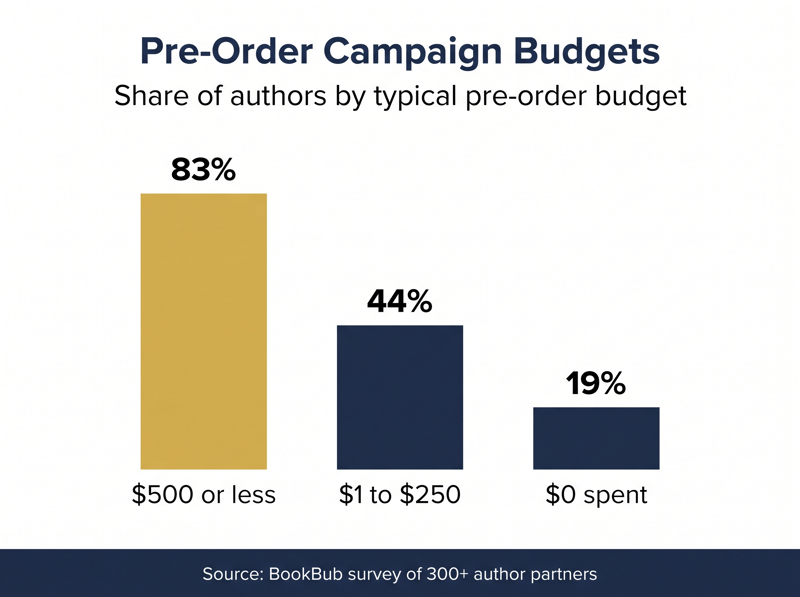
Less than you might think. Pre-order promotion is mostly time and relationships, and the budgets reflect that.
If you do spend, put money where it compounds after launch. Ads that drive pre-orders help rank, but ads that run in launch week benefit from the reviews you have collected by then. Our Amazon Ads for authors guide covers how to avoid wasted spend once the book is live.
How do reviews fit into a pre-order launch?
The pre-order window is your review runway. Readers who order early cannot see what others thought yet, and the buyers who arrive in launch week will look for reviews before they click. Use the weeks before release to get your book into the hands of advance readers so honest reviews can start appearing as soon as the book is live.
Read & Rate is built for this stage. You upload your ARC, every PDF download is watermarked with the reviewer's email so leaks can be traced, and reviewers choose where to post: Amazon (including which storefront), Barnes & Noble, Goodreads, Apple Books, Google Books, or a custom link. Each reviewer also leaves you a private comment, which is useful feedback while there is still time to adjust your description or marketing. Our ARC book reviews guide explains the full process, and how many reviews a book needs shows what to aim for.
Keep every ARC request clean. Gift the copy, ask for an honest review, and never tie anything to a star rating. Our guide to Amazon review rules for authors covers what is allowed.
Your KDP pre-order checklist
- Finish or nearly finish the manuscript before you open the pre-order||Pick a release date with at least a week of buffer beyond the 72-hour deadline||Upload a polished file, since buyers may preview it through Look Inside||Set your launch price first, especially if you sell on Amazon.de||Polish the description, cover, keywords, and categories, because there are no reviews yet||Send ARCs to advance readers so reviews can arrive in launch week||Concentrate promotion in the final 4 to 12 weeks through your newsletter and social channels||Schedule KDP Select promotions for after release, not before||Submit the final manuscript early and select Submit for pre-order
Frequently asked questions
Make the pre-order work for your launch
The September 2026 update makes KDP pre-orders safer and more flexible, but the fundamentals have not changed. Lock in a realistic date, submit a finished file early, and use the waiting period to build a list of readers and reviewers who are ready on day one. If you want advance reviews flowing on Amazon and beyond by launch week, Read & Rate is free to try.